Instrument of Destruction.
Optimus Prime: “I lived 4,000,000 years, and I was killed by this?”
Chuka Cannon.
The killer phallic symbol.
In the wild, mouse at the ready, hunting down links
Instrument of Destruction.
Optimus Prime: “I lived 4,000,000 years, and I was killed by this?”
Chuka Cannon.
The killer phallic symbol.
Posted in Web.
Comments Off on Elsewhere on the web
– Wednesday, July 25, 2007

Posted in Pix, Strike a pose, Toys.
Comments Off on Strike a pose 7/52
– Wednesday, July 25, 2007
Nightfall monster CG models.
It’s nice to see this because it was hard to truly appreciate the Guild Wars monster designs while battling them.
“I’d love to, but I don’t want to.”
Examples of bad videogame translation.
Art inspired by dance club culture.
“… the modern dj is almost like a contempary wizard and his energy casts a spell over touusands of people that makes thier bodies twist and move at his whim.” And speaking of spelling …
Posted in Web.
Comments Off on Elsewhere on the web
– Wednesday, July 25, 2007
Konami’s Diorama Studio software is a remarkable program that puts a virtual action figure (based on designs from the Busou Shinki toyline) on your PC. It’s a free program but the fact it’s in Japanese may intimidate non-Japanese fans who are keen to try it out.
In previous guides, I showed you how to download and install Diorama Studio, display Japanese text on a non-Japanese edition of Windows XP, create a Konami ID and select and pose a CG model in the Diorama Studio Model Editor.
In part 1 of the Diorama Studio Diorama Viewer guide, I showed you how to select a diorama background and load a posed model and in part 2, I showed how to position the model in the diorama background and save your diorama data.
In this guide, I’ll show how you to load a saved diorama, position the camera and take a screenshot.
Posted in Busou Shinki, Diorama Studio.
Comments Off on Diorama Studio Diorama Viewer guide part 3
– Wednesday, July 25, 2007
Konami’s Diorama Studio software is a remarkable program that puts a virtual action figure (based on designs from the Busou Shinki toyline) on your PC. It’s a free program but the fact it’s in Japanese may intimidate non-Japanese fans who are keen to try it out.
In previous guides, I showed you how to download and install Diorama Studio, display Japanese text on a non-Japanese edition of Windows XP, create a Konami ID and select and pose a CG model in the Diorama Studio Model Editor.
In the first part of the Diorama Studio Diorama Viewer guide, I showed you how to select a diorama background and load a posed model into the diorama background. I left you at this screen:
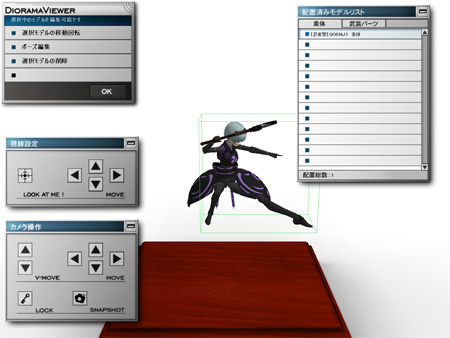
In this guide, I’m going to show you how to position the model in the diorama background and save your diorama data.
Posted in Busou Shinki, Diorama Studio.
Comments Off on Diorama Studio Diorama Viewer guide part 2
– Monday, July 23, 2007
