Skip to content


Stuck on you

A 20-inch display with a resolution of 1680×1050 has 1,764,000 pixels. You would think one pixel wouldn’t be able to stand out among 1.7 million pixels. And yet if that one pixel happens to be a stuck pixel on my spanking new display, it does stick out.
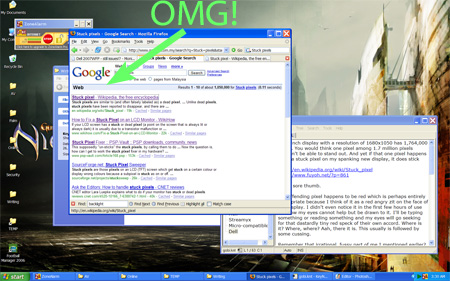
Dell 2007WFP stuck pixel

Hello, sore thumb.

The offending pixel happens to be red which is perhaps entirely appropriate because I think of it as a red zit on the face of my display. I didn’t even notice it in the first few hours of using the display but now my eyes cannot help but be drawn to that pixel. I’ll be typing something or reading something and my eyes will go seeking for that dastardly tiny red speck of their own accord. Where is it? Where, where? Aah, there it is. This is usually followed by some cussing.

Remember that irrational, fussy part of me I mentioned earlier? It may be a little part of me but damn, it can be loud.

This is completely stupid, of course. I cannot even figure out why I obsess over something as tiny as this.

At one point, I thought there were two stuck pixels on my monitor and had begun gnashing my teeth and spewing expletives before I realised the other stuck pixel was actually a speck of dust which was easily wiped off.

So, yeah, it’s definitely stupid.

It’s one stuck pixel.

Among 1.7 million pixels.

I could raise such a fuss over this that Dell would have to send a replacement just to shut me up. But there’s no guarantee the replacement unit would be free of flaws. The replacement might have problems with colour banding, severe backlight bleeding, excessive flickering or dead pixels. I could end up trying replacement after replacement without satisfying my high standards.

Another option is try the various folk remedies that reputedly fix stuck pixels.

But I think it’s better to let go.

Embrace the flaw.

Be one with nature.

Om-m-m-m …

Where is it? Where, where?

Ah, there it is.

Son of a …

Posted in Hardware.


The Runeslayer

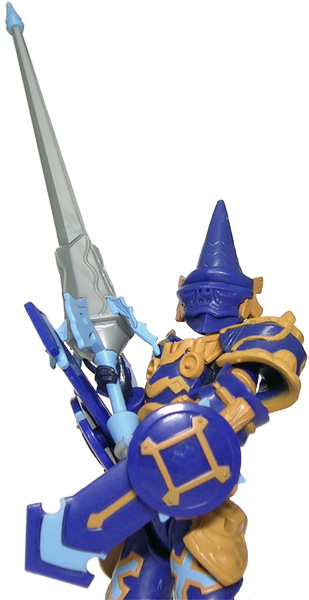
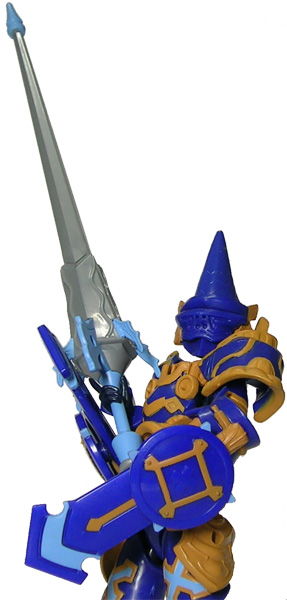
Xevoz Runeslayer

A photo of a Xevoz Runeslayer from the Runeslayer vs Firedrake set.

He slays runes, seriously injures letters and I’m not even going to go into what he does to pictograms.

Posted in Pix, Toys, Xevoz.


How droll

Takara Binaltech Tracks

A photo of Takara Binaltech Tracks.

Posted in Pix, Toys, Transformers.


Colour me bad

I mentioned earlier my problems with my CRT display. It may not have been clear to you what the big deal was so here’s an example of how it affected me.

This was a photo that looked perfectly all right on my CRT before calibration:

Busou Shinki Xiphos pre-calibration

This is a photo on my LCD display that looked all right after calibration:
Busou Shinki Xiphos post-calibration

The differences before and after calibration can be just as jarring when it comes to other PC applications. Web sites look different to me since I now see colours and gradients where I previously saw only murky darkness. It’s also now clear to me my problems with Guild Wars had nothing to do with extreme goth sensibilities on the part of ArenaNet’s artists.

There are various ways of calibrating your monitor. Professional graphics artists or photographers will probably be best served by high-end solutions costing a few hundred dollars but the hoi polloi can make do with various free solutions available on the net. I would strongly recommend looking at imagebased calibration at the very least since it would give you an indication of whether adjustments are necessary.

Posted in Hardware.


El See Dee, Too

I placed my order for the 20-inch Dell UltraSharp 2007WFP widescreen display early Tuesday morning, made my payment via Interbank Giro later the same day and was pleasantly surprised to receive the display today at noon. This was faster than I expected.

This was faster than Dell expected as well. The company’s online order status page initially estimated the display would be delivered on the 31st before amending it to the 29th. The local carrier then called me on Thursday to expect delivery between 2pm to 5pm on Friday.

I mention all this because “faster than expected” is not usually a phrase heard by Malaysians.

The display comes in two separate boxes: a large one for the display and stand, and a smaller one for the power cord. Dell probably separates the power cord to make it easier to accommodate sales from different countries. The label on the display box notes my 2007WFP is Rev A03 and made in China.

Setting up the display is straightforward thanks to the instructions included. The first thing you have to do is to attach the display to the stand and this involves aligning and inserting four tabs on the stand to corresponding slots behind the display.

The next step is to attach the cables. The power cable is a simple matter but you have a choice when it comes to graphics cables. The display comes with two types of graphics cable: a VGA cable and a DVI-D cable. The VGA cable was attached but I removed that and went with the DVI-D cable instead. (See this site for an explanation of why the DVI-D connection is preferable.)

Then the moment of truth: I booted up the PC.

Nothing exploded. A good sign.

Since my Windows XP desktop was set previously to 1024×768, everything looked stretched in widescreen. I quickly switched to 1680×1050, the 2007WFP’s native display. (Note that this resolution was immediately available in the desktop properties once the display had been attached.)

The colours looked too bright and washed out initially but that was because Adobe Gamma was using settings for my old CRT. I calibrated the LCD display and it looks all right to me now.

I then went into the service menu to check the panel type. The panel code is RT803 and a Google search reveals this to be a S-IPS panel. I’d like to reiterate my doubts whether I could actually differentiate between an S-IPS and an S-PVA panel. But a little part of me — an irrational, fussy part — is happy that I got the “better” one.

I haven’t made any rigorous checks for dead pixels, colour banding, backlight bleeding or flickering as yet; I’ll do that over the weekend. Right now, my priority is ensuring readability. I’ve changed the DPI setting to 120dpi and turned on ClearType but I’m still having slight problems reading small text on some web pages at 1680×1050. It will take me a while to find fonts that are neither too big nor too small.

Posted in Hardware.