Skip to content


Creating a Konami ID

Konami has recently changed the Konami ID registration process so this guide is no longer valid. Please see my new guide.

I’ve been so impressed by Konami’s Diorama Studio software for the Busou Shinki toyline that I’ve decided to put together a few guides for installing and using the program. These simple guides are aimed at non-Japanese Busou Shinki fans who are keen on using the program but who are perhaps a little intimidated by the fact it’s in a foreign language.

Both Diorama Studio and Battle Rondo (Busou Shinki’s online game component) share the same installer and launcher. Before you can use either, though, you will first have to create a Konami ID and install the client software.

This guide will only detail the steps you need to create your own Konami ID.
Continued…

Posted in Diorama Studio, Software.


Elsewhere on the web

Respectfully, Frank Welker.
“I do truly believe a lot of fans will miss hearing that scraggly, scratchy, but very identifiable voice.” Damn straight.

The ghost of Starscream.
A striking figure and a striking photo.

Toys going virtual.
“… kids are flocking to these kid-friendly interactive websites. And some of the most popular toys of recent generations are maintaining their popularity in the real world through virtual world applications.” Toy properties cited included Barbie, Lego and Hot Wheels. The article doesn’t state whether these online tie-ins are creating new fans.

BOOM!
That’s life for you. One moment you’re hunting for your contact lens, the next moment you’re shot with four large arrows and then you’re killed by a falling boom.

Posted in Web.


Mo’ Diorama Studio

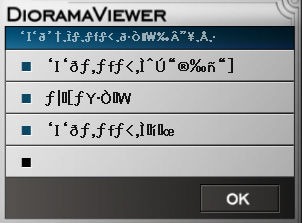
I managed to get the Japanese text to display correctly in Diorama Studio after fiddling and experimenting with several Windows XP language settings. So, instead of seeing this:
Konami Busou Shinki Diorama Studio gibberish text
I’m now seeing this:
Konami Busou Shinki Diorama Studio gibberish text
That’s much better. I’ll post a how-to guide for Windows XP users later on.

I’ve been playing around with Diorama Studio and have been really impressed by it. But I’m absolutely staggered by the possibilities and what it could mean for the toy industry. For the longest time, the toycos have been wondering what to do with the videogame generation. Kids are abandoning toys for videogames and electronics at an ever younger age.

Diorama Studio could be the solution.
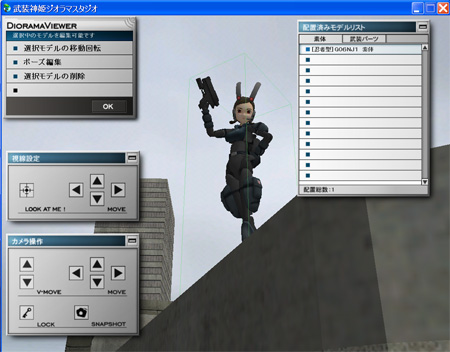
Konami Busou Shinki Diorama Studio diorama viewer
With some tweaks here and there, this could not only interest kids who previously stayed away from toys but it could also draw gaming adults who are too reluctant to play with actual toys.

The only thing Diorama Studio lacks at the moment is characters with cachet. Konami’s got a stable of interesting characters but can you imagine what companies like Takara Tomy, Hasbro and Bandai could do with something like this?
Konami Busou Shinki Diorama Studio diorama viewer

Instead of WaffeBunny, imagine Optimus Prime, a Microman or a Gundam in that editor. Or how about a game character like Solid Snake or Kratos?

This may very well be a new way to play.

Posted in Busou Shinki, Diorama Studio, Software.


Ninja on my PC

Konami Busou Shinki Diorama Studio

It took me over two and a half hours to download the installer and it took almost three and a half hours to download all the updates but it was all worth it. Konami’s Diorama Studio is one of the best pieces of software I’ve downloaded recently.

So what is it?

I’m going to tell you.

No, wait, I’m going to blow your mind now.

Are you ready?

Here’s what it does: action figure on your desktop.

Konami Busou Shinki Diorama Studio

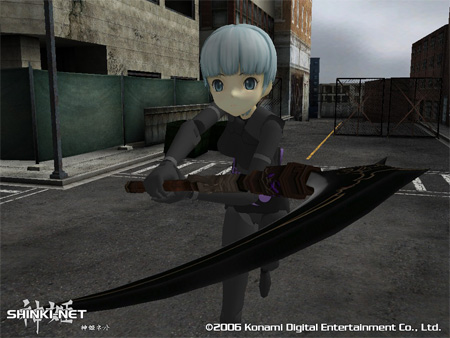
Seen here is Ninja Fubuki, the free CG model bundled with the Diorama Studio program. I messed around with the program briefly and came up with screenshot above. I was previously staggered by the possibilities but there are a couple of things that are frustrating me.

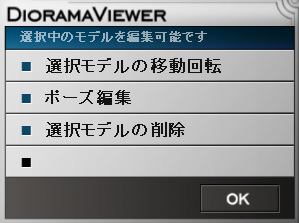
The main annoyance for me right now is I can’t figure out how to display the Japanese fonts in the program so using the software involves clicking on an option with gibberish on it and extrapolating what it does. I’ve installed the Japanese language options as described here and I’ve set the “Language for non-Unicode programs” option to Japanese but I’m still seeing indecipherable gibberish in the program instead of Japanese text.

Any tips or hints from anyone who’s successfully configured their Windows XP box to run Japanese programs would be gratefully appreciated.

Update Jun 16: I managed to get the Japanese text to display correctly. See this guide for details.

Posted in Busou Shinki, Diorama Studio, Software.


Elsewhere on the web

Tonka’s Legions of Power. [via]
Motorised vehicles with action figure pilots. It looks as if the vehicles may feature interchangeable parts.

What’s his name again?
No doubt the creative geniuses who came up with this will be coming up with a Human Torch Water Squirter soon.

Hasbro vs Hasbro vs Hasbro.
“Hasbro holds the master toy license to three Marvel comic-book movies being released this summer, ‘Spider-Man 3,’ ‘Transformers’ and ‘Fantastic Four: Rise of the Silver Surfer.’ That means the manufacturer will essentially be competing against itself in the toy aisle.” Ah, but Transformers is not a Marvel comic book movie even though it once was a Marvel comic book.

Kezzaroo’s Little People.
Hand-made felt little puppets for your lapel, pocket or bag. Favourites: 1, 2, 3.

Posted in Web.