Skip to content


Displaying Japanese text in Windows XP 2/3

In a previous guide, I showed you how to display Japanese text correctly in Konami’s Diorama Studio program. As mentioned previously, you cannot launch the Diorama Studio executable directly. You will have to launch Diorama Studio through the ShinkiNET Launcher.

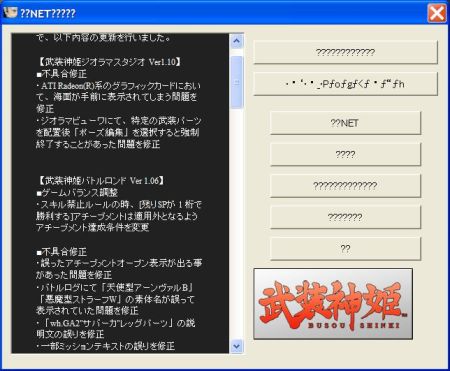
Mysteriously, even after configuring Windows XP to display Japanese text correctly in Diorama Studio, the ShinkiNET Launcher will still display gibberish like this:

ShinkiNET Launcher: gibberish

Now you don’t actually have to display the Japanese text correctly in the ShinkiNET Launcher. There are only seven options in the ShinkiNET Launcher and Diorama Studio is the first. So, there’s no great need for you to change your Windows XP language settings. On top of that, some non-Japanese programs might lose some functionality or behave oddly when the Windows XP language settings are changed so I would actually recommend not doing this.

However, if you would like to see the Japanese text display correctly in the ShinkiNET Launcher as well, here’s how you go about it.

Continued…

Posted in Diorama Studio, Software.


Displaying Japanese text in Windows XP 1/3

In a previous guide, I detailed the steps needed to create a Konami ID. In this guide, I’m going to show you how to display Japanese text correctly in Diorama Studio, Konami’s fantastic virtual action figure and diorama software, when using the Japanese program on a non-Japanese edition of Windows XP.

I must emphasise that this is entirely optional. It isn’t necessary to do this in order to get the program to run but it may make it easier for you to navigate through the program.

I must also point out changing the language settings on your Windows XP system may cause some non-Japanese programs to behave oddly and you might even lose some functionality in some programs. I therefore strongly recommend switching back to your original language settings once you’re done using Diorama Studio.

There are a couple of good guides out there that show you how to display Japanese text correctly in Japanese programs on a non-Japanese Windows XP system. However, if you’re interested only in displaying Japanese text correctly in Diorama Studio, there are a couple of steps in those guides you can omit and moreover, there is one step that is omitted in those guides.

Diorama Studio is part of the ShinkiNET suite of programs which include the ShinkiNET Launcher and Battle Rondo, the Busou Shinki online game. You cannot directly launch the Diorama Studio executable and you will have to go through the ShinkiNET Launcher to do so.

I mention this because displaying Japanese text correctly in Diorama Studio requires different steps compared to displaying Japanese text correctly in the ShinkiNET Launcher.

Before we begin, I’d just like to remind you that I’m not a Windows XP expert and I’m not tech support. I should not be held accountable for problems that may crop up. That said, I have successfully configured my system and I would like to share with you how I did it.

Continued…
Posted in Diorama Studio, Software.


Elsewhere on the web

6th Philippines Toycon.
Flickr user Powerpee has photos. There was also an interview with Floro Dery in which he reveals Unicron’s original name.

Well, I’ll be …
Someone finally found a use for Protoform Optimus Prime.

Ponch!
I wonder if he was especially nice to the kid because he read what George Lopez had to say about him.

Posted in Web.


Hand

Konami Busou Shinki Diorama Studio

Click on the thumbnail image above to see the full-size image of a series of screenshots taken with Konami’s Diorama Studio software. This one features Siren Eukrante and Ninja Fubuki in the Ghost Town diorama background.

I hope to put together a mini-guide for using Diorama Studio but in the meantime, here’s an important tip. When posing the CG model in the pose editor, click on an articulation point and then hit the spacebar to cycle through the axes of a joint. This will make it much, much easier to pose joints.

Posted in Busou Shinki, Diorama Studio, Software.


Strike a pose 2/52

Takara Tomy Action Hero Pro: Strike a pose

“Aay!”

Posted in Pix, Strike a pose, Toys.